

LiveScore Bet on Low Data
What really eats your bundle on a casino site, how to set your phone up so a ₦1,000 top-up lasts, and which games to leave for Wi-Fi.


The short answer
LiveScore Bet has no built-in lite mode, so you save data yourself. Live dealer video is the heaviest thing on the site; a slot is costly only on its first load and cheap after that. Play slots on mobile data, keep live tables for Wi-Fi, turn on your phone's Data Saver or Low Data Mode, and deposit by USSD, which uses no data at all.
Why data matters for Nigerian players
For most people in Nigeria the phone is the casino, and the phone runs on prepaid bundles. Whether you are on MTN, Airtel, Glo or 9mobile, every megabyte comes out of money you could have staked — and a bundle that disappears halfway through a live blackjack shoe is a real cost, not a technical detail.
Network quality adds to it. When a connection drops from 4G to 3G in a crowded area, video streams step down, re-buffer and ask for the same data again. Slots cope far better: once a game is on your phone, each spin is a tiny message to the server and back.
None of this changes your odds. Results are decided on the game server, so playing on low data is about cost and comfort, not about winning more or less.
What uses the most data
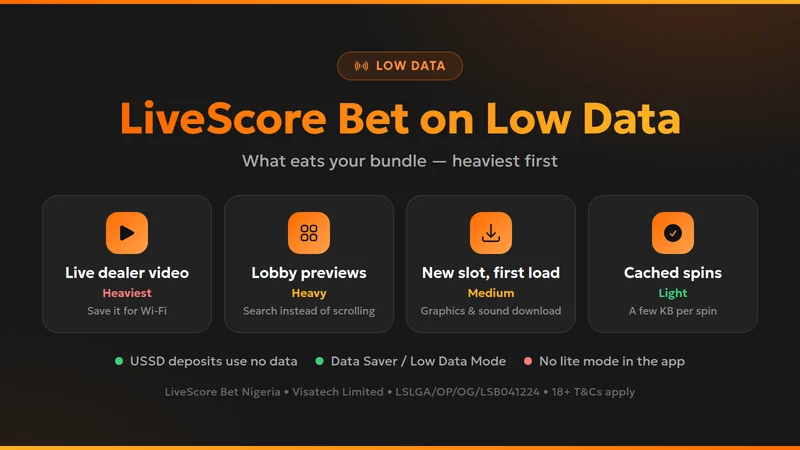
Live dealer tables. Evolution's roulette, blackjack and game shows are continuous video. Even at a lower quality they can use hundreds of megabytes an hour. Crazy Time and Monopoly Live, with their bonus-round animations, are among the hungriest.
A busy lobby. Casino lobbies load dozens of game tiles, and some tiles play short animated previews. Scrolling through the whole lobby every session costs more than people expect. Use search instead.
The first load of a slot. Opening a new slot downloads its graphics and sound, often several megabytes. Opening it again later costs very little, as long as the cache is still there.
Spins, bets and the cashier. Once a game is loaded, each spin sends a few kilobytes. Deposits, withdrawals and your bet history are simple pages. Aviator sits in between: the game is light, but it updates live, so it keeps using a trickle of data the whole time it is open.
Step by step: set up LiveScore Bet for low data
Pick one way in and stay with it
Use either the official app (App Store, Google Play, or the APK from LiveScore Bet's own site on Huawei phones) or one browser. Switching means downloading everything twice.
Turn on your phone's data saving
Android: Settings → Network & internet → Data Saver. iPhone: Settings → Mobile Data → Mobile Data Options → Low Data Mode. Both stop background apps from using your bundle while you play.
Don't clear the cache between sessions
"Cleaner" apps that wipe browser data force every game to download again. Leave the cache alone for the browser you play in.
Search, don't scroll
Type the game name in the casino search instead of browsing the lobby. Keep a short list of favourites.
Save live tables and live streams for Wi-Fi
On mobile data, stick to slots and table games without a dealer. Open the live lobby only on a strong Wi-Fi connection.
Deposit by USSD
USSD runs over the phone network with no data. LiveScore Bet accepts it from ₦100, the same minimum as bank transfer and cards.
Check your real usage once
After one normal session, open your phone's data usage screen and look at the figure for your browser or the app. That is your own benchmark.
Low-data checklist
Tick off what you have already done. The list stays on this screen only — nothing is saved or sent.
Typical mistakes
Opening Crazy Time on a nearly empty bundle
Game shows are the heaviest thing in the casino. A stream that stalls mid-round wastes both data and patience.
Using "extreme" browser compression
Heavy data-saving browser modes can break the scripts that run casino games. Use a normal browser mode and save data elsewhere.
Downloading APKs from random sites
Only take the Android file from LiveScore Bet's own website or Google Play. Modified APKs can steal logins and cost you far more than data.
Blaming the casino for lag
A spin that hangs is nearly always the network. The server finishes the round; check your history before spinning again.
Before and after
| Before | After |
|---|---|
| Scroll the whole lobby to find a game | Search by name or open a favourite |
| Live roulette on 4G during the commute | Slots on the go, live tables at home on Wi-Fi |
| Phone updates apps in the background | Data Saver / Low Data Mode on while playing |
| Clear the cache "to speed things up" | Keep the cache so games start without re-downloading |
| Buy data just to fund the account | Deposit by USSD, which uses no data |
Swipe the table sideways if it is cut off
Light, quick-loading slots are the natural fit for mobile data. Starburst is a good example — small, simple and easy on a bundle; see our LiveScore Bet Starburst guide, and the game providers page for what else is in the lobby.
Low data FAQ
No. Neither the LiveScore Bet app nor the mobile site has a lite or data-saving switch. You save data with your phone's settings and with how you play — slots over live tables on mobile data, Wi-Fi for streams, and a warm cache.
It depends almost entirely on what you play. Live dealer tables stream video and can use hundreds of megabytes in an hour. A slot costs the most on its first load; after that each spin sends very little. Browsing the cashier or your bet history is lighter still. Check your phone's per-app data counter after one session to get your own number.
The app keeps more of the site on your phone, so repeat visits usually download less. The mobile site works just as well if you keep the same browser and don't clear its cache between sessions. Whichever you use, stick to one — switching between them means downloading everything twice.
Yes. USSD works over the normal phone network with no data at all, and LiveScore Bet accepts USSD deposits from ₦100. You still need a connection to place bets or spin, but funding the account costs nothing in data.
The first load downloads the game's graphics, sounds and code — often several megabytes. The browser or app then keeps them, so the next time you open the same game it starts almost instantly. Clearing the cache throws that away and you pay for the download again.
No. The result of every spin or hand is decided on the game server, not on your phone. A weak connection can make a game freeze or reconnect, and an unfinished round is completed by the server — you will see the outcome in your history.
Play smart on a small bundle
Set your phone up once and a modest top-up goes a long way. Payment methods, withdrawal times and support hours are all in our LiveScore Bet Casino review.
Welcome Bonus
100% up to ₦100,000
First deposit match, paid as free bets
Min deposit ₦100 • No promo code needed
 By Sarah Thompson, Casino Review Lead